
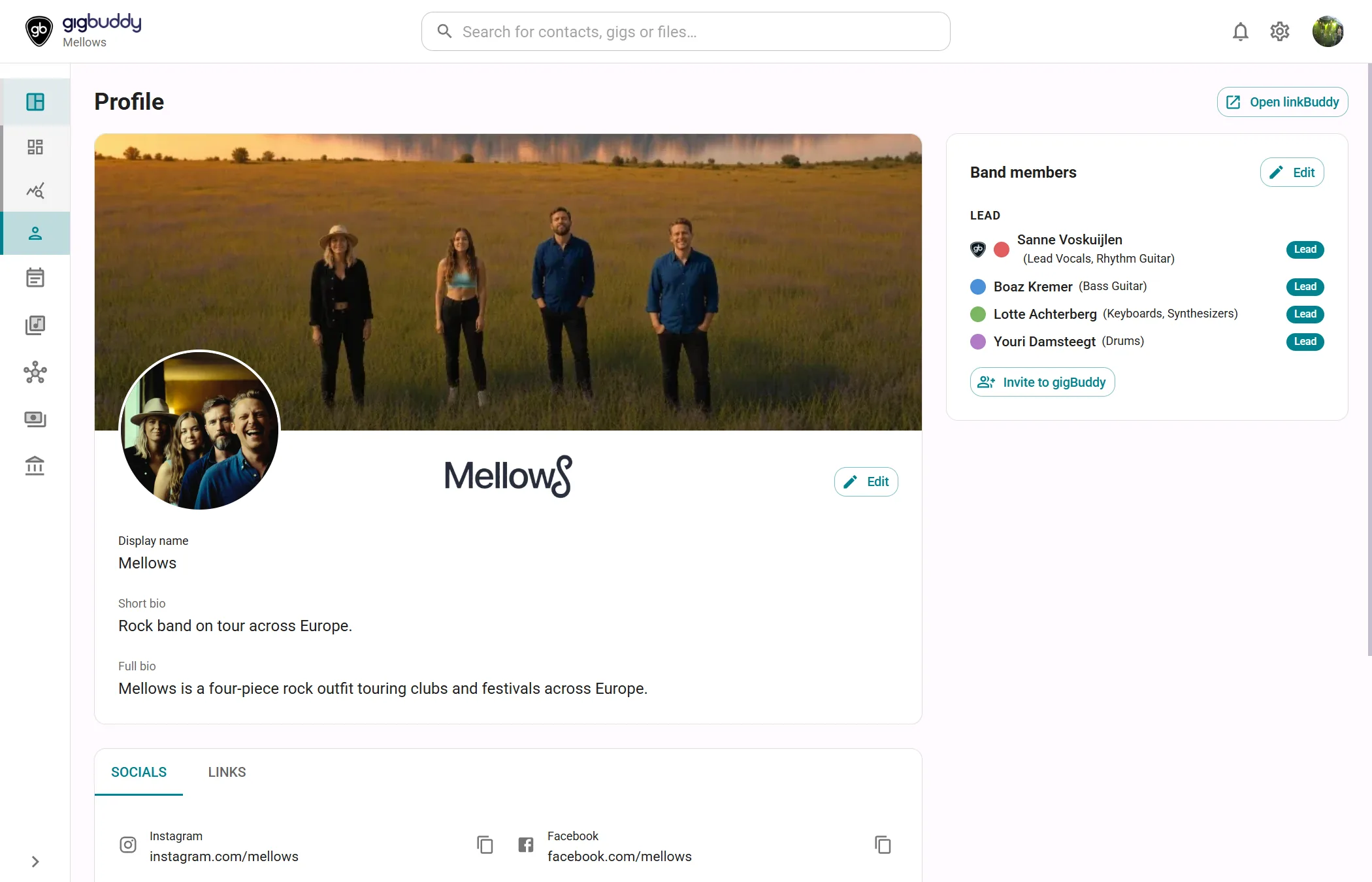
Profile contains the band’s display name, images, biographies, social handles, links, booking information, members and accolades. You read and edit the profile here. The same page is available for an artist profile, with the differences described below.
Open Profile
- In the side menu, under Overview, select Profile.
Every member can read the page. Contributor or higher can edit the display name, biographies, socials, links and bookings, and manage the band roster and accolades. A Reader sees the profile without edit controls. Uploading the profile images and choosing the public biography language require Admin.
Each card or tab has its own Edit control where applicable. Done returns that part to its reading view.
What the page contains
| Area | What it shows |
|---|---|
| Identity card | Banner, profile picture, theme-specific logo, name, genres and the selected biography language. |
| Socials, Links, Bookings | Tabs below the identity card. The page opens on Socials. |
| Band members | In a band: roster grouped by Lead, Optional and Sub. Each member shows their colour, musical roles and position. A gigBuddy badge identifies a linked user account. |
| My roles | In an artist profile, replaces the band roster with your musical roles. These are instruments or performance roles, separate from Reader, Contributor, Financial admin and Admin access. |
| Accolades | Dated awards or press quotes, with an image or placeholder and an optional source link. Newest dates appear first. The card starts in Grid view; Timeline view shows them along a timeline. |
Display name and biographies
| Field | What to enter or select | Notes |
|---|---|---|
| Display name | The name shown for the workspace. | Changes also update the name in the app header. |
| Genres | Search the grouped list and choose up to three genres. Remove a selected chip to make room for another. | Band only, for Contributor or higher. |
| Bio language | Choose English, Nederlands, Français, Deutsch, Español or Italiano. | Each language has its own short and full bio. Opens on the published language, or English if none is published. Switching language does not publish it. |
| Short bio | Short text for the selected language. | At most 150 characters. |
| Full bio | Longer biography for the selected language. |
The language picker is available outside edit mode too. To choose which language your public link page shows, select the star labelled Show this language on your link page. Admin only. Write a bio in that language first. The published language has a filled star labelled Shown on your link page. Only one language is public at a time.
Profile images
| Image | Control | Notes |
|---|---|---|
| Logo | Change logo | Choose Light theme logo or Dark theme logo from the camera menu. Admin on every plan. Dark mode uses the dark logo when available, otherwise the light logo. |
| Banner | Change banner | Admin with Custom branding (Band Silver or higher, Artist Gold). |
| Profile picture | Change profile picture | Admin with Custom branding (Band Silver or higher, Artist Gold). Shown in a circular frame. |
Camera controls appear while the identity card is being edited. They accept JPEG, PNG and WebP. Choosing a file opens a crop dialog: drag the handles, then select Use this crop. The banner crop has a fixed 820:360 ratio, the logo crop is free, and the profile picture crop is square and shown in a circle. Without Custom branding, the banner and profile-picture controls show a diamond and lead to upgrade options; logo uploads remain available to Admin.
Socials
Select Edit on this tab and enter the ID or handle for Instagram, Facebook, TikTok, YouTube and Spotify. The helper underneath shows the resulting address. Copy URL copies that address in both reading and editing view.
A band also has Bandsintown artist name. When Bandsintown is configured in Settings › Integrations, edit mode offers Fetch from Bandsintown. It requires Contributor or higher on Band Silver or higher and an artist ID configured for the band. The import fills the returned artist name and social handles, replacing existing values where Bandsintown returns a value. It needs an internet connection.
Links
Each saved link shows its label and address. Open in new tab opens it in another tab.
- Enter Label and URL in the new row.
- Select Add link to save the link.
Edit link switches an existing row to editable fields. Done editing returns to reading view. Delete link removes the link. Contributor or higher.
Bookings
| Field | What to enter or select | Notes |
|---|---|---|
| Fee from / Fee to | The lower and upper amount of your fee indication. | Clear a value to remove it. |
| Primary repertoire | Covers, Tribute or Original songs. | Not specified clears the selection. |
| Booking email address / Booking phone number | Contact details for booking enquiries. | Separate from the business contact details printed on invoices. |
| Allow others to contact you for booking information | Allow your booking contact details to be shared with interested bookers. | Off by default. The press-bio export includes booking contact only when this is on and an email address or phone number is present. |
Amounts use the workspace currency from Settings › Accounting profile › Base currency.
Band members
The band roster is shown separately from login access. Lead members are included automatically in new rehearsal proposals; Optional and Sub members can be selected when needed. Adding a roster entry does not send an invitation.
Select Edit on the card to reveal Add member, Edit member and Delete member. These actions create, change or remove roster entries, for Contributor or higher. The Invite to gigBuddy button opens the members settings. It is shown to Admin when at least one Lead member has no linked gigBuddy account.
My roles
In an artist profile, select Edit to choose musical roles. Use the up and down arrows to set the order in which your selected roles appear. Changes save automatically; Done returns to reading view. Contributor or higher.
Accolades
Grid view and Timeline view are available to every member when the card has entries. Open source opens an entry’s source in a new tab.
add accolade adds an accolade. Edit on the card reveals each entry’s Edit and Delete actions. These need Contributor or higher. Editing uses the grid.
Actions
| Action | Where | What it does |
|---|---|---|
| Edit / Done | Identity card, Socials and side cards | Switches that part between reading and editing. |
| Change logo, Change banner, Change profile picture | Identity card in edit mode | Chooses an image and opens the crop dialog. Image upload access is listed above. |
| Show this language on your link page | Star beside Bio language | Publishes the chosen bio language for the link page. Admin. |
| Export › Press bio (PDF) | Page header | Opens Export press bio. Every member on Band Silver or higher, or Artist Gold. Without the feature it shows a diamond and an upgrade link. |
| Open linkBuddy | Page header, band only | Opens the separate linkBuddy editor in a new tab. Admin on Band Silver or higher. Hidden if the integration is not configured; without the plan feature a diamond opens upgrade options. |