
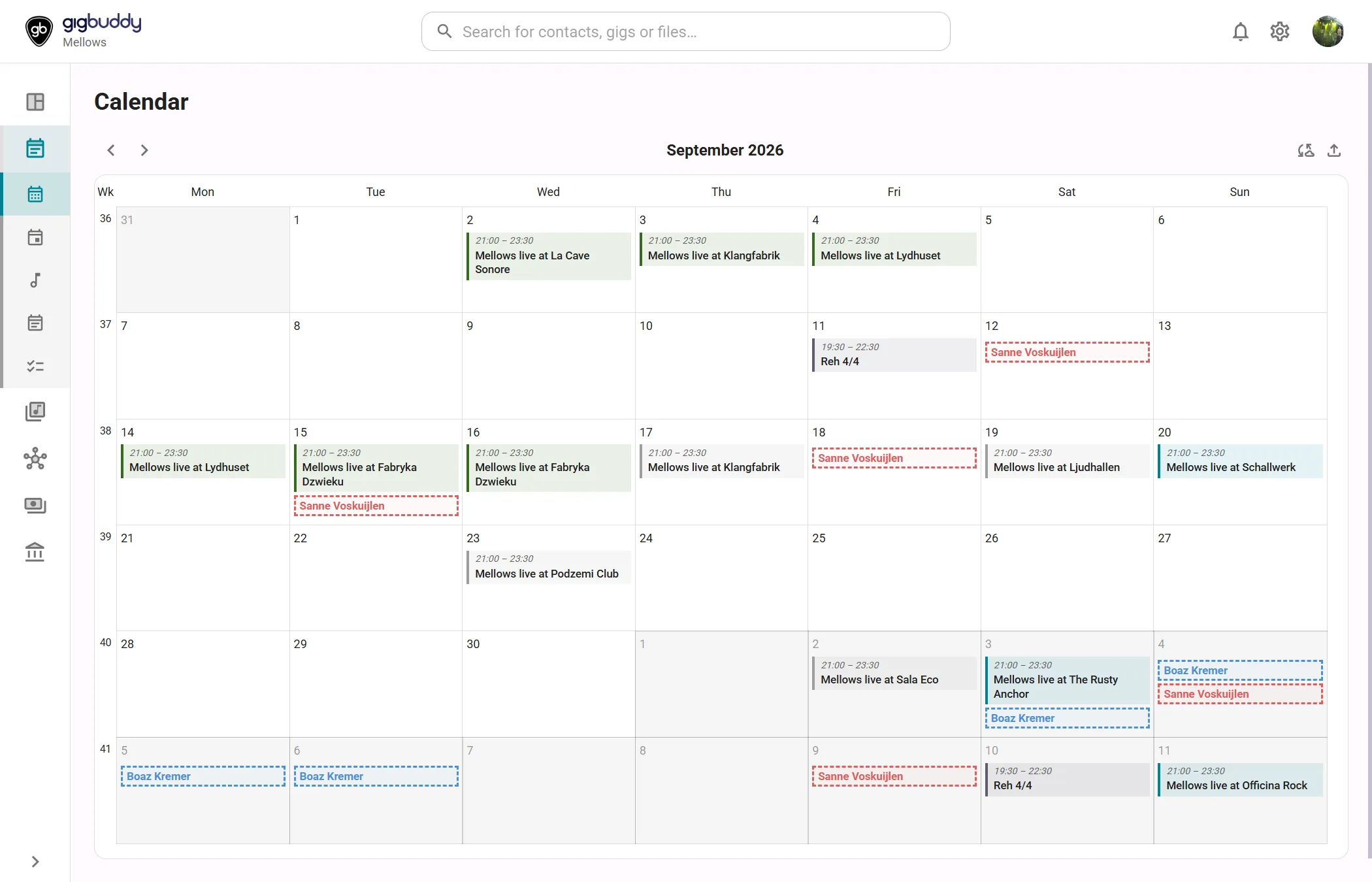
Calendar shows gigs, rehearsals, band events and availability in a month grid. Select an event to open its details.
Open Calendar
- In the side menu, under Planning, select Calendar.
Available in a band and an artist profile. Every member can view the calendar and maintain their own availability. Contributor or higher can create planning items and manage band-wide availability. Maintaining another member’s availability requires their delegation when that member has an account.
What the page contains
| Area | What it shows |
|---|---|
| Month grid | Opens on the current month. Week numbers and day cells show events and availability. Select the month heading to choose another month in the same year. |
| Band calendar | The band’s gigs, rehearsals and events. Rehearsals show their yes-vote count. Multi-day band events appear across their date span. |
| Availability | Member colours identify availability bars. Available is filled; unavailable has a dashed outline. Whole-band slots use a separate lane. Bookings and combined summaries are read-only. Travel-margin spillover is not drawn in this grid. |
| Artist calendar | Combines your events and required bookings from your bands. Your availability is labelled Me. There is no band roster grid, month export or subscription button on this view. |
| Phone view | Days show dots. Select a day to see its items below the grid. Swipe left or right to change month. |
Actions
| Action | Where | What it does |
|---|---|---|
| previous month / next month | Month header | Moves one month back or forward, including across year boundaries. |
| Select a day | Desktop grid | Opens the add menu with the date prefilled. Select a start day, then Shift-click a later day to prefill an availability range. |
| add event | Phone, below the calendar | Opens the add menu for the selected day. |
| Availability | Add menu | Adds availability. In a band you choose a member or Whole band; in an artist profile it belongs to you. |
| Gig, Rehearsal, Band Event | Band add menu | Creates the chosen type of planning item. For rehearsal proposals, see Rehearsals. |
| Personal event | Artist add menu | Adds your own event. The artist menu also offers Gig and Availability. |
| Select an availability bar | Grid or day list | Edits or deletes an editable slot. Derived bookings cannot be edited as slots. |
| Export month to calendar (.ics) | Band month header | Opens Export calendar below. |
| Subscribe to calendar | Band month header | Opens the subscription dialog. Needs Band Silver or higher. Without it the button shows a diamond and opens the upgrade options. |
Dialogs
Export calendar
Choose Gigs, Rehearsals and/or Band events. All three start selected. Export downloads an .ics file for the displayed month and closes the dialog. Only confirmed and announced gigs and planned rehearsals are included; options are excluded. Band events are included when selected. This is a snapshot; later changes do not update the downloaded file.
Subscribe to calendar
- Select Generate link if no feed exists.
- Use Copy link beside Calendar feed URL.
- Add the link as a subscribed calendar in Google Calendar, Apple Calendar or Outlook.
| Action | What it does |
|---|---|
| Regenerate link | Creates a new link and invalidates the old one. Replace it in any calendar that subscribed to it. |
| Disable feed | Stops the feed. |
| Close | Closes the dialog. |
The link is personal; do not share it. Subscription updates require an internet connection and depend on the external calendar fetching the feed.
The subscription contains the band's gigs, rehearsals and band events, including options. It does not include availability slots. This differs from the month export, which excludes options.
Event details
Select an event bar or a day-list item to open its details next to the calendar on a wide screen, or in place of it on a phone. See Rehearsal details and Band event details. For privacy, delegation and travel-margin settings, see Availability.